


Cosmo Casino App for Kiwi Players
New Zealanders appreciate mobile play, be it Android or iOS. That’s why we decided to make our casino as accessible on the go as possible. There are no strict hardware requirements for you to meet before you’re able to play our 1,000+ games or sign up to get 150 FS on a top-ranking jackpot slot.
About the Cosmo Casino App
Our application is a PWA (Progressive Web App). Due to both the Play Store’s and App Store’s harsh gambling-related content policies, apps that allow users to win real money don’t meet the guidelines.
Our solution was to allow you to “download” a web app through the preferred browser. We keep it updated on our side with the latest games and functionality, so you can always access our services at their best.
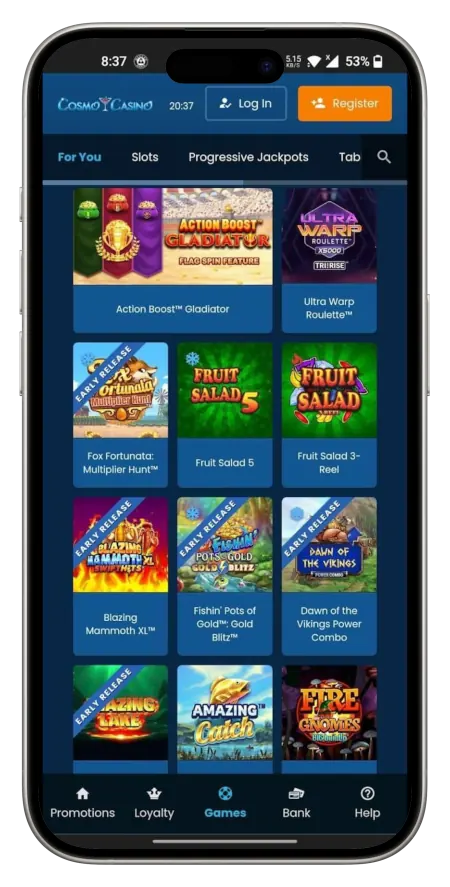
You also get fast and convenient navigation through 5 key buttons at the bottom (Promotions, Loyalty, Games, Bank, Help). All games are available for instant play, you just need to tap the PWA.
Advantages of ComsoCasino PWA
Even though a full-fledged, downloadable app is the default choice for a number of platforms, PWAs have their own perks. Here’s what you can expect:
- Our app doesn’t take up any space;
- No need to download or install anything;
- No need to worry about updates;
- Our progressive Cosmo Casino app is compatible with both tablets and smartphones.
How to Install on Android?
Android device holders have a clear road ahead of them. The app’s “installation” does not take more than 1-2 minutes. Here are the steps involved:
- Visit our main website in any mobile browser and tap on the login button at the top.
- Get to the sign-in window, input relevant credentials, and log yourself in.
- See the main interface of the gambling section and then use the three dots in the top-right corner.
- In the newly opened drop-down menu, select the option that says “Install app” or “Add to Home Screen”.
- Confirm your intention to go through with the Cosmo Casino app download and installation in the form of PWA in the pop-up.
Finally, you’ll see a new icon with our logo on your home screen. That way, you will be able to play our games, use bonuses, and withdraw your winnings in a matter of seconds.
How to Install on iOS?
The process of installation is just as uncomplicated on iPhone and iPad. To make sure you’re able to instantly play our high-RTP games on Apple devices, you must do the following:
- Boot up Safari (or any other browser) and go to our official website.
- Log in to your account to gain access to the main gambling hub.
- With the main page loaded, tap the Share icon (a square with an upwards arrow) at the bottom of your screen.
- Scroll down and pick “Add to Home Screen” once you see it.
- Rename the shortcut if you want and tap “Add” in the top rightmost corner of this prompt.
Find the new Cosmo Casino NZ icon on your home screen. You can now use it to launch the full-screen application and start playing. Our tip is that, for the best experience possible, you must update your iOS to the latest version. Also, make sure the cookies are allowed in your browser’s settings.
Cosmo Casino Online App PC
Alongside progressive apps for your mobile, you can also simplify access on your computer. This experience is essentially similar to what you get on smart devices. Since the app runs directly in your browser, the performance may vary depending on your hardware.
To download the app for your desktop, you must go through the same initial steps as described above. Log in to your existing account or create a new one to start things off. Then, it’s different, as you must click on your profile icon. From there, choose the “Settings” tab.
There’s going to be a big “Install” button (blue colour, downwards-facing arrow). Click on it to see the prompt asking you if you want to install the Casino Cosmo app on your PC. Give your consent, and it will be added to your browser.
Registration via the App
You can sign up via the app, and it’s similar to the process on the website. The first step would be acquiring the program via any of the methods described above. Then, you must use the orange-coloured button in the top right corner to trigger the enrollment process. You will then be guided through a secure, multi-page form that requires you to fill out key personal details. For example, you will be asked to provide your full name, email, date of birth, and a strong password.
It’s vital to be as precise as possible while specifying your NW address. Also, make sure that NZD is set as your account’s primary currency to prevent possible conversion issues. After entering your contact number and occupation as the last step, you can opt into our bonuses.
Be sure to securely note your auto-generated username and the password you picked, as these will be used as your credentials for Cosmo Casino mobile and PC.
How to Fund Your Cosmo Casino Account?
After the registration, you can play all our 1,000+ games, but in order to win real money, you have to complete a deposit first. The process is straightforward. Here is what you must do:
- Click on the Bank button in the bottom menu.
- Scroll to examine the presented depositing tools (7 in total).
- Pick the one that you prefer.
- Input the amount of money you want to transfer (10 NZD is the minimum)
- Add all the additional details, if required, or press the orange button to continue.
- Complete the transaction via the payment provider’s secure system.
The deposit should appear in your casino account right away. It was our intention to make all incoming payments instant. If it takes longer than an hour for the money to turn up, get in touch with our support staff. They can handle any payment-related issue with ease.
Registration Bonus for All New Mobile Players
Even a minimum deposit is going to trigger our generous welcome offer. With 10 NZD or more, you are going to get 150 free spins (0.10 NZD each) on the Mega Money Wheel slot. Your second top-up will be boosted by a 100% match up to 250 NZD, essentially doubling your gambling budget.
To make sure you use this reward wisely, check out the terms and conditions. You will be able to figure out the best strategy for rolling over the extra funds you were given.
Safety of the Application
The Cosmo mobile casino app is every bit as secure as the website. We employ the latest SSL tech to protect all incoming and outgoing transactions as well as player data. This ensures that all sensitive info is kept protected from any potential third-party threats in transfer and in storage. We also have a dedicated team that monitors suspicious activity.
You can add even more protection by using the Passkey option in the “Settings” tab of your account area. You can set up several passkeys to be verified via Google’s password manager, your personal smartphone, tablet, or any device that can act as your access key.
In case you want to be briefed on how to better protect your account, get in touch with our support. We can give you a few pointers when it comes to protecting your profile, be it on mobile devices or on desktop.